accesskeys | Duplicate accesskey attribute values | — | BPbest practice | — | suggestion
serious | |
area-alt | Area element missing alt text | 2.4.4, 4.1.2 | A | Operable, Robust | failure / review
critical | |
aria-allowed-attr | Unsupported ARIA attribute used | 4.1.2 | A | Robust | failure / review
critical | |
aria-allowed-role | Inappropriate ARIA role used | — | BPbest practice | — | suggestion
minor | |
aria-braille-equivalent | aria-braille missing non-braille equivalent | 4.1.2 | A | Robust | failure / review
serious | |
aria-command-name | ARIA command missing accessible name | 4.1.2 | A | Robust | failure / review
serious | |
aria-conditional-attr | ARIA attribute misused for role | 4.1.2 | A | Robust | failure / review
serious | |
aria-deprecated-role | Deprecated ARIA role used | 4.1.2 | A | Robust | failure / review
minor | |
aria-dialog-name | Dialog missing accessible name | — | BPbest practice | — | suggestion
serious | |
aria-hidden-body | aria-hidden set on body | 1.3.1, 4.1.2 | A | Perceivable, Robust | failure / review
critical | |
aria-hidden-focus | Hidden element is focusable | 4.1.2 | A | Robust | failure / review
serious | |
aria-input-field-name | Input field missing accessible name | 4.1.2 | A | Robust | failure / review
serious | |
aria-meter-name | Meter missing accessible name | 1.1.1 | A | Perceivable | failure / review
serious | |
aria-progressbar-name | Progressbar missing accessible name | 1.1.1 | A | Perceivable | failure / review
serious | |
aria-prohibited-attr | Prohibited ARIA attribute used | 4.1.2 | A | Robust | failure / review
serious | |
aria-required-attr | Required ARIA attribute missing | 4.1.2 | A | Robust | failure / review
critical | |
aria-required-children | Role missing required children | 1.3.1 | A | Perceivable | failure / review
critical | |
aria-required-parent | Role missing required parent | 1.3.1 | A | Perceivable | failure / review
critical | |
aria-roledescription | roledescription on non-semantic element | 4.1.2 | A | Robust | failure / review
serious | |
aria-roles | Invalid ARIA role value | 4.1.2 | A | Robust | failure / review
critical | |
aria-tab-name | Tab missing accessible name | 4.1.2 | A | Robust | failure / review
serious | |
aria-text | role=text has focusable descendants | — | BPbest practice | — | suggestion
serious | |
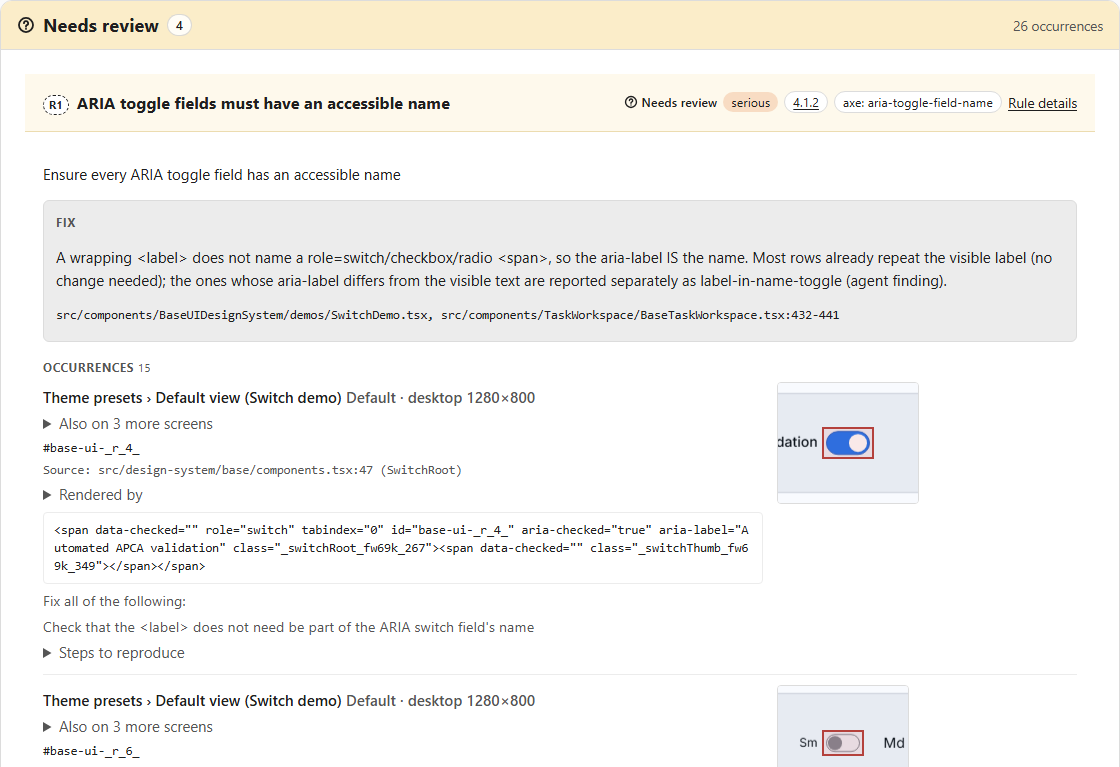
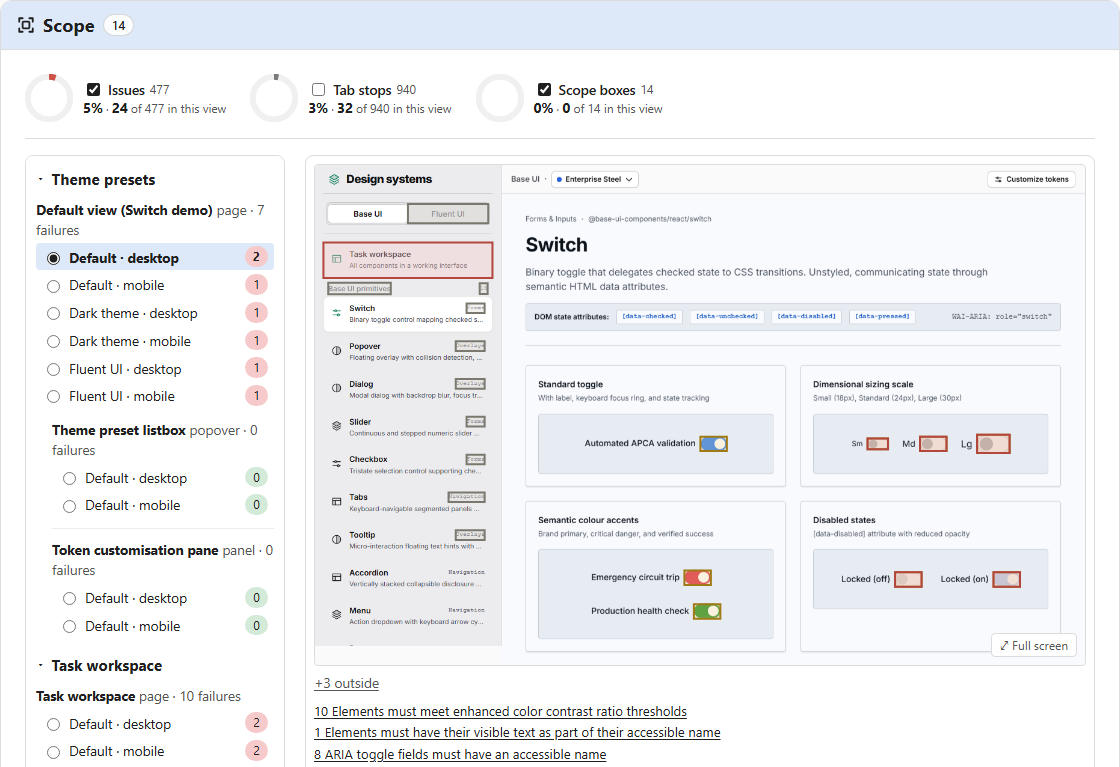
aria-toggle-field-name | Toggle field missing accessible name | 4.1.2 | A | Robust | failure / review
serious | |
aria-tooltip-name | Tooltip missing accessible name | 4.1.2 | A | Robust | failure / review
serious | |
aria-treeitem-name | Treeitem missing accessible name | — | BPbest practice | — | suggestion
serious | |
aria-valid-attr | Invalid ARIA attribute name | 4.1.2 | A | Robust | failure / review
critical | |
aria-valid-attr-value | Invalid ARIA attribute value | 4.1.2 | A | Robust | failure / review
critical | |
audio-caption | Audio missing captions track | 1.2.1 | A | Perceivable | failure / review
critical | |
autocomplete-valid | Invalid autocomplete attribute value | 1.3.5 | AA | Perceivable | failure / review
serious | |
avoid-inline-spacing | Inline text spacing not adjustable | 1.4.12 | AA | Perceivable | failure / review
serious | |
blink | Deprecated blink element used | 2.2.2 | A | Operable | failure / review
serious | |
button-name | Button missing discernible text | 4.1.2 | A | Robust | failure / review
critical | |
bypass | No way to bypass blocks | 2.4.1 | A | Operable | failure / review
serious | |
color-contrast | Insufficient text color contrast | 1.4.3 | AA | Perceivable | failure / review
serious | |
color-contrast-enhanced | Insufficient enhanced color contrast | 1.4.6 | AAA | Perceivable | suggestion
serious | |
css-orientation-lock | CSS locks display orientation | 1.3.4 | AA | Perceivable | failure / review
serious | |
definition-list | Invalid definition list structure | 1.3.1 | A | Perceivable | failure / review
serious | |
dlitem | dt/dd not inside dl | 1.3.1 | A | Perceivable | failure / review
serious | |
document-title | Document missing title element | 2.4.2 | A | Operable | failure / review
serious | |
duplicate-id-aria | Duplicate ARIA/label id value | 4.1.2 | A | Robust | failure / review
critical | |
empty-heading | Heading has no text | — | BPbest practice | — | suggestion
minor | |
empty-table-header | Table header text empty | — | BPbest practice | — | suggestion
minor | |
focus-order-semantics | Focus order element wrong role | — | BPbest practice | — | suggestion
minor | |
form-field-multiple-labels | Form field has multiple labels | 3.3.2 | A | Understandable | failure / review
moderate | |
frame-focusable-content | Focusable frame has tabindex=-1 | 2.1.1 | A | Operable | failure / review
serious | |
frame-tested | Frame content needs review | — | BPbest practice | — | suggestion
critical | |
frame-title | Frame missing accessible name | 4.1.2 | A | Robust | failure / review
serious | |
frame-title-unique | Frame title not unique | 4.1.2 | A | Robust | failure / review
serious | |
heading-order | Heading levels skip a level | — | BPbest practice | — | suggestion
moderate | |
hidden-content | Hidden content needs review | — | BPbest practice | — | suggestion
minor | |
html-has-lang | html element missing lang | 3.1.1 | A | Understandable | failure / review
serious | |
html-lang-valid | Invalid html lang value | 3.1.1 | A | Understandable | failure / review
serious | |
html-xml-lang-mismatch | lang and xml:lang mismatch | 3.1.1 | A | Understandable | failure / review
moderate | |
identical-links-same-purpose | Same-name links differ in purpose | 2.4.9 | AAA | Operable | suggestion
minor | |
image-alt | Image missing alternative text | 1.1.1 | A | Perceivable | failure / review
critical | |
image-redundant-alt | Alt text repeats visible text | — | BPbest practice | — | suggestion
minor | |
input-button-name | Input button missing text | 4.1.2 | A | Robust | failure / review
critical | |
input-image-alt | Image button missing alt text | 1.1.1, 4.1.2 | A | Perceivable, Robust | failure / review
critical | |
label | Form element missing a label | 4.1.2 | A | Robust | failure / review
critical | |
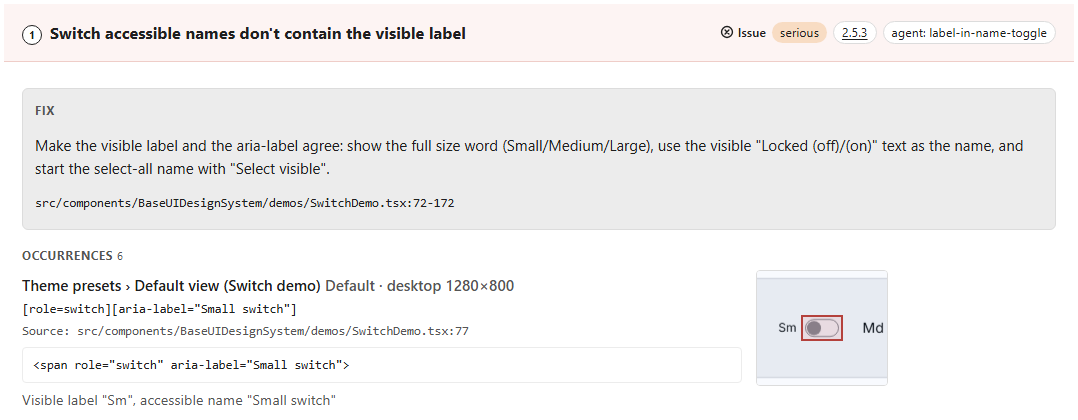
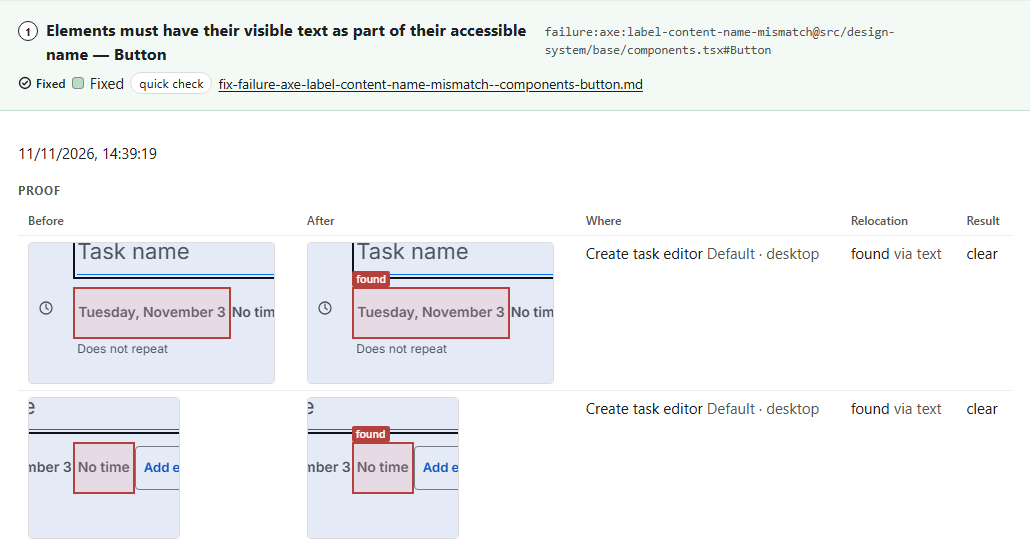
label-content-name-mismatch | Accessible name omits visible text | 2.5.3 | A | Operable | failure / review
serious | |
label-title-only | Label is not visible | — | BPbest practice | — | suggestion
serious | |
landmark-banner-is-top-level | Banner nested in landmark | — | BPbest practice | — | suggestion
moderate | |
landmark-complementary-is-top-level | Aside nested in landmark | — | BPbest practice | — | suggestion
moderate | |
landmark-contentinfo-is-top-level | Contentinfo nested in landmark | — | BPbest practice | — | suggestion
moderate | |
landmark-main-is-top-level | Main nested in landmark | — | BPbest practice | — | suggestion
moderate | |
landmark-no-duplicate-banner | Multiple banner landmarks present | — | BPbest practice | — | suggestion
moderate | |
landmark-no-duplicate-contentinfo | Multiple contentinfo landmarks present | — | BPbest practice | — | suggestion
moderate | |
landmark-no-duplicate-main | Multiple main landmarks present | — | BPbest practice | — | suggestion
moderate | |
landmark-one-main | Page missing main landmark | — | BPbest practice | — | suggestion
moderate | |
landmark-unique | Landmarks not uniquely identified | — | BPbest practice | — | suggestion
moderate | |
link-in-text-block | Link distinguishable only by color | 1.4.1 | A | Perceivable | failure / review
serious | |
link-name | Link missing discernible text | 2.4.4, 4.1.2 | A | Operable, Robust | failure / review
serious | |
list | Invalid list markup structure | 1.3.1 | A | Perceivable | failure / review
serious | |
listitem | li not inside ul/ol | 1.3.1 | A | Perceivable | failure / review
serious | |
marquee | Deprecated marquee element used | 2.2.2 | A | Operable | failure / review
serious | |
meta-refresh | Page auto-refreshes under 20 hours | 2.2.1 | A | Operable | failure / review
critical | |
meta-refresh-no-exceptions | Page uses delayed refresh | 2.2.4, 3.2.5 | AAA | Operable, Understandable | suggestion
minor | |
meta-viewport | Zooming and scaling disabled | 1.4.4 | AA | Perceivable | failure / review
moderate | |
meta-viewport-large | Cannot zoom text to 500% | — | BPbest practice | — | suggestion
minor | |
nested-interactive | Interactive controls are nested | 4.1.2 | A | Robust | failure / review
serious | |
no-autoplay-audio | Audio or video autoplays | 1.4.2 | A | Perceivable | failure / review
moderate | |
object-alt | Object missing alternative text | 1.1.1 | A | Perceivable | failure / review
serious | |
p-as-heading | Paragraph styled as heading | 1.3.1 | A | Perceivable | failure / review
serious | |
page-has-heading-one | Page missing level-one heading | — | BPbest practice | — | suggestion
moderate | |
presentation-role-conflict | Presentational role inconsistently ignored | — | BPbest practice | — | suggestion
minor | |
region | Content outside any landmark | — | BPbest practice | — | suggestion
moderate | |
role-img-alt | role=img missing alt text | 1.1.1 | A | Perceivable | failure / review
serious | |
scope-attr-valid | Incorrect table scope attribute | — | BPbest practice | — | suggestion
moderate | |
scrollable-region-focusable | Scrollable region not keyboard accessible | 2.1.1, 2.1.3 | A AAA | Operable | failure / review
serious | |
select-name | Select missing accessible name | 4.1.2 | A | Robust | failure / review
critical | |
server-side-image-map | Server-side image map used | 2.1.1 | A | Operable | failure / review
minor | |
skip-link | Skip link target missing | — | BPbest practice | — | suggestion
moderate | |
summary-name | Summary element missing text | 4.1.2 | A | Robust | failure / review
serious | |
svg-img-alt | SVG image missing alt text | 1.1.1 | A | Perceivable | failure / review
serious | |
tabindex | Positive tabindex value used | — | BPbest practice | — | suggestion
serious | |
table-duplicate-name | Table summary duplicates caption | — | BPbest practice | — | suggestion
minor | |
table-fake-caption | Data cell used as caption | 1.3.1 | A | Perceivable | failure / review
serious | |
target-size | Touch target too small | 2.5.8 | AA | Operable | failure / review
serious | |
td-has-header | Data cell missing header | 1.3.1 | A | Perceivable | failure / review
critical | |
td-headers-attr | headers attribute references wrong cell | 1.3.1 | A | Perceivable | failure / review
serious | |
th-has-data-cells | Header not referencing data cells | 1.3.1 | A | Perceivable | failure / review
serious | |
valid-lang | Invalid lang attribute value | 3.1.2 | AA | Understandable | failure / review
serious | |
video-caption | Video missing captions | 1.2.2 | A | Perceivable | failure / review
critical | |
focusable-element-label | Focusable element has no label | 4.1.2, 2.4.6 | A AA | Robust, Operable | failure
serious | |
focusable-in-atomic | Focusable element nested in control | 4.1.2 | A | Robust | failure
serious | |
contrast | Insufficient text contrast | 1.4.3 | AA | Perceivable | failure
serious | |
missing-id | ARIA reference targets missing id | 1.3.1, 4.1.2 | A | Perceivable, Robust | failure
serious | |
focus-lost | Keyboard focus lost on change | 2.4.3, 2.1.1 | A | Operable | failure
serious | |
bad-focus | Focus moved to invisible element | 2.4.7, 2.4.3 | A AA | Operable | failure
serious | |
tabindex-non-interactive | tabindex on non-interactive element | — | BPbest practice | — | suggestion
minor | |
focus-not-moved-into-dialog | Focus not moved into dialog | 2.4.3 | A | Operable | failure
serious | |
initial-focus-outside-overlay | Focus not moved into a non-modal overlay (popover, menu, drawer, non-modal dialog) on open | 2.4.3 | A | Operable | review
moderate | |
focus-not-visible | No visible focus indicator | 2.4.7 | AA | Operable | failure
serious | |
keyboard-trap | Keyboard focus is trapped | 2.1.2 | A | Operable | failure
critical | |
focus-escapes-modal | Focus leaves modal dialog | 2.4.3 | A | Operable | failure
serious | |
focus-obscured | Focused element fully hidden | 2.4.11 | AA | Operable | failure
serious | |
focus-partially-obscured | Focused element partly hidden | 2.4.12 | AAA | Operable | suggestion
minor | |
not-keyboard-focusable | Interactive element not focusable | 2.1.1 | A | Operable | failure
serious | |
escape-does-not-close | Escape does not close overlay | — | BPbest practice | — | suggestion
moderate | |
focus-not-restored | Focus lost when overlay closes | 2.4.3 | A | Operable | failure
serious | |
focus-not-returned-to-trigger | Focus not returned to trigger | — | BPbest practice | — | suggestion
moderate | |
reflow-horizontal-scroll | Horizontal scroll at 320px | 1.4.10 | AA | Perceivable | failure
serious | |
text-spacing-clipping | Text clipped with text spacing | 1.4.12 | AA | Perceivable | review
moderate | |
sr-blank-announcement | Focused element announced as "blank" or unlabelled | 4.1.2 | A | Robust | failure
serious | |
sr-control-without-name | Control announced without a name | 4.1.2 | A | Robust | failure
serious | |
sr-missing-role | Focusable element announced without a role | 4.1.2 | A | Robust | failure
serious | |
sr-missing-state | Expanded/pressed/checked/selected state not announced | 4.1.2 | A | Robust | failure
moderate | |
sr-dialog-not-announced | Dialog opened without being announced | 4.1.2 | A | Robust | failure / review
serious | |
sr-focus-not-in-dialog | Focus not moved into the opened dialog (review for non-modal dialogs) | 2.4.3 | A | Operable | failure / review
serious | |
sr-focus-not-returned | Focus not returned after the dialog closed | 2.4.3 | A | Operable | failure / review
moderate | |
sr-status-not-announced | Status message not announced | 4.1.3 | AA | Robust | failure / review
serious | |
sr-error-not-announced | Validation error not announced (review when inferred from an id/class) | 3.3.1, 4.1.3 | A AA | Understandable, Robust | failure / review
serious | |
sr-silent-action | Action produced no announcement | 4.1.2 | A | Robust | review
moderate | |
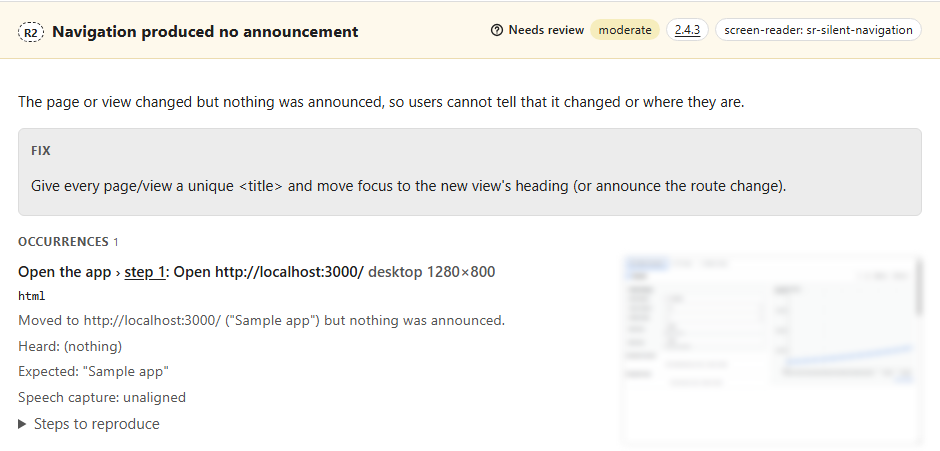
sr-silent-navigation | Navigation produced no announcement (failure, 2.4.2, when the page has no title) | 2.4.3 | A | Operable | review / failure
moderate | |
sr-duplicate-announcement | Duplicated announcement | — | BPbest practice | — | suggestion
minor | |
sr-verbose | Very long announcement (over 160 characters) | — | BPbest practice | — | suggestion
minor | |
sr-symbol-noise | Emoji or icon-font glyph in the announcement | 1.1.1 | A | Perceivable | suggestion
minor | |
sr-reading-order | Reading order differs from visual order | 1.3.2 | A | Perceivable | review
moderate | |
sr-no-landmarks | No main landmark | 2.4.1 | A | Operable | review
moderate | |
sr-no-headings | No headings | 1.3.1 | A | Perceivable | review
moderate | |
srnav-not-reachable | Element not found with reader navigation (point to verify)
modality: sr-navigation | — | BPbest practice | — | review
moderate | |
srnav-no-semantic-nav | Headings/landmarks exist but none announced
modality: sr-navigation | — | BPbest practice | — | review
moderate | |
srnav-focus-mode-required | Browse mode could not be confirmed while reading
modality: sr-navigation | — | BPbest practice | — | review
minor | |
sr-autofocus-focus-mode | Editable field autofocused, reader starts in focus mode
modality: sr-keyboard, sr-navigation | — | BPbest practice | — | suggestion
minor | |
kbd-mouse-required | Step can only be completed with a mouse
modality: keyboard | 2.1.1 | A | Operable | failure
critical | |
kbd-programmatic-focus | Reachable only by moving focus programmatically
modality: keyboard | 2.1.1, 2.4.3 | A | Operable | failure
serious | |
kbd-not-focusable | Interactive element cannot receive focus
modality: keyboard | 2.1.1 | A | Operable | failure
serious | |
kbd-trap | Keyboard focus trapped
modality: keyboard | 2.1.2 | A | Operable | failure
critical | |
kbd-no-activation | Enter/Space does not activate the focused control
modality: keyboard | 2.1.1 | A | Operable | failure
serious | |
kbd-composite-no-arrows | Composite widget items not reachable with arrows (catalogued, not emitted yet)
modality: keyboard | 2.1.1 | A | Operable | failure
serious | |
kbd-focus-lost | Focus lost after activation (catalogued, not emitted yet)
modality: keyboard | 2.4.3 | A | Operable | review
moderate | |
kbd-hover-only | Content may be hover-only
modality: keyboard | — | BPbest practice | — | review
moderate | |
kbd-programmatic-intervention | A script was needed to continue the journey
modality: keyboard | — | BPbest practice | — | review
moderate | |
kbd-search-inconclusive | Press limit reached, inconclusive
modality: keyboard | — | BPbest practice | — | review
moderate | |
kbd-activation-unobserved | Activation produced no observable change
modality: keyboard | — | BPbest practice | — | review
moderate | |
kbd-step-skipped | Step skipped for this modality
modality: keyboard | — | BPbest practice | — | review
moderate | |
kbd-nonstandard-key | Navigation relies on keys outside the allowed set
modality: keyboard | — | BPbest practice | — | suggestion
minor | |
kbd-unexpected-autofocus | Editable field takes focus on load (catalogued, not emitted yet)
modality: keyboard | — | BPbest practice | — | suggestion
minor | |
apg-keyboard-support | Missing required keyboard support | 2.1.1 | A | Operable | failure | |
apg-role-state | Wrong or missing ARIA state | 4.1.2 | A | Robust | failure | |
apg-optional-behaviour | Optional APG pattern behaviour missing | — | BPbest practice | — | suggestion | |
tab-order-reading-order | Tab order skips reading order | 1.3.2, 2.4.3 | A | Perceivable, Operable | review | |
color-only-state | State shown by color alone | 1.4.1 | A | Perceivable | review | |
text-on-image-contrast | Text over image low contrast | 1.4.3 | AA | Perceivable | review | |
image-of-text | Image used instead of text | 1.4.5 | AA | Perceivable | review | |
non-text-contrast | Borders or icons low contrast | 1.4.11 | AA | Perceivable | review | |
ambiguous-heading-label | Heading or label not descriptive | 2.4.6 | AA | Operable | review | |
focus-indicator-per-theme | Focus indicator missing in theme | 2.4.7 | AA | Operable | review | |
orientation-lock | Content locked to one orientation | 1.3.4 | AA | Perceivable | review | |
text-resize-clipping | Clipping at 200 percent zoom | 1.4.4 | AA | Perceivable | review | |
tooltip-dismiss-hover | Tooltip not dismissible or hoverable | 1.4.13 | AA | Perceivable | review | |
character-key-shortcut | Single-key shortcut not remappable | 2.1.4 | A | Operable | review | |
drag-pointer-alternative | Drag action lacks button alternative | 2.5.1, 2.5.7 | A AA | Operable | review | |
unexpected-context-change | Focus or input changes context | 3.2.1, 3.2.2 | A | Understandable | review | |
error-identification-suggestion | Error not named or suggested | 3.3.1, 3.3.3 | A AA | Understandable | review | |
status-not-announced | Status update not announced | 4.1.3 | AA | Robust | review | |
page-title-not-distinct | Page title not descriptive | 2.4.2 | A | Operable | review | |
single-navigation-path | Only one way to page | 2.4.5 | AA | Operable | review | |
inconsistent-navigation-order | Navigation order changes between pages | 3.2.3 | AA | Understandable | review | |
inconsistent-control-identification | Same control named differently | 3.2.4 | AA | Understandable | review | |
inconsistent-help-location | Help location changes between pages | 3.2.6 | A | Understandable | review | |
repeated-input-request | Flow asks for data twice | 3.3.7 | A | Understandable | review | |